
In addition to the CB Insights integration with LinkedIn, we’ve now integrated CB Insights with Gmail and Google Apps for Work. Our integration automatically detects the investors, companies and/or acquirers you are emailing with and shows you the data we have on them right in your email.
Below are two illustrations of how the email integration works based on email exchanges I’ve had – one with an investor and one with someone at a startup. After the examples, I’ll walk through how you can start using the gmail integration in 3 easy steps.
- Investor – First, you’ll see an email exchange I had with Satya Patel of Homebrew. All the details of the emails have obviously been blurred out to ensure you still don’t know Satya and Hunter’s plans for world domination.
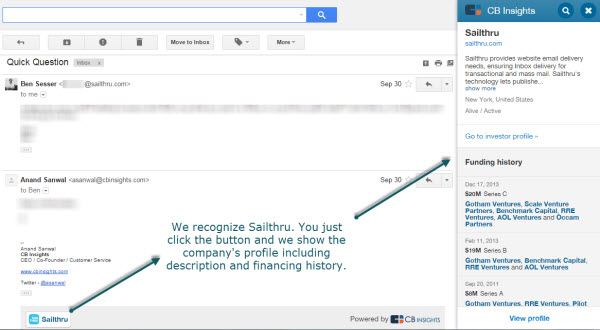
- Startup – The second screenshot is from an email exchange with Ben Sesser of very hot NYC startup Sailthru. Again, all trade secrets have been removed.
Get investor/acquirer data right in your email
When you open the email, we automatically recognize all the entities in the email. In this case, it recognizes that Satya works at Homebrew and includes a button to Homebrew’s profile in the email. By clicking on the button, I can see Homebrew’s investor profile and their recent investment activity from right within my email.

See a startup’s financing history right in your email
In the below example, our technology recognizes that Ben works at Sailthru and puts the company’s profile button right into my email. Upon clicking it, I see the company’s investors and funding history. Yes – just that easy.
How can you use the CB Insights integration with Gmail / Google Apps for Work?
- Create an account on CB Insights or you can do so below
- Download the CB Insghts Chrome plugin (which does a lot more which you can see here)
- Enjoy being more productive